


This AddOn makes your IPCop into a Munin node, so it can be monitered by a Munin Server. node, so it can be monitered by a Munin Server.
Installation
- download munin-ipcop-<version>.tar.gz from this webpage
- copy "munin-ipcop-<version>.tar.gz" to any directory of your choice ( e.g. to "/root" using WinSCP or SCP [ port 8022! ] )
- go straight to the console or open a console connection ( e.g. via Putty or SSH [ port 8022! ] )
- login as user "root"
- change to the directory you have copied the file to ( e.g. type "cd /root" )
- extract the archive ( type "tar xvfz munin-ipcop-<version>.tar.gz" )
- change to installation directory ( type "cd munin-ipcop-<version>" )
- to install the addon type "./install -i" ( to uninstall type "./install -u" )
Upgrading
Just follow the steps under Installation, no need to uninstall first.
Usage
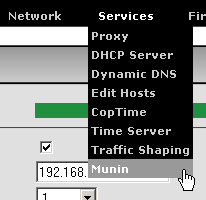
After installation you should have an extra menu-item for Munin:
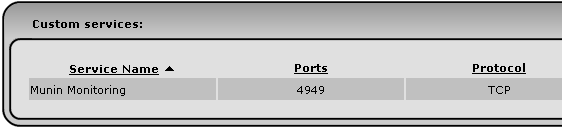
And a Custom firewall service for the Munin communication was automatically added:
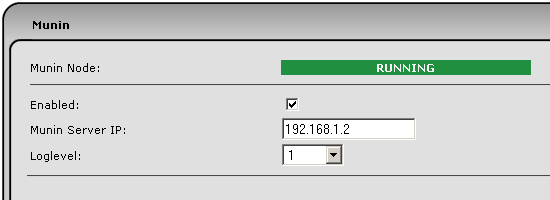
You will need to enable the service and configure the IP address of the server that will be monitoring your (IPCop) node:
All that is missing now is an IPCop Access firewall rule for the Munin Monitoring service:
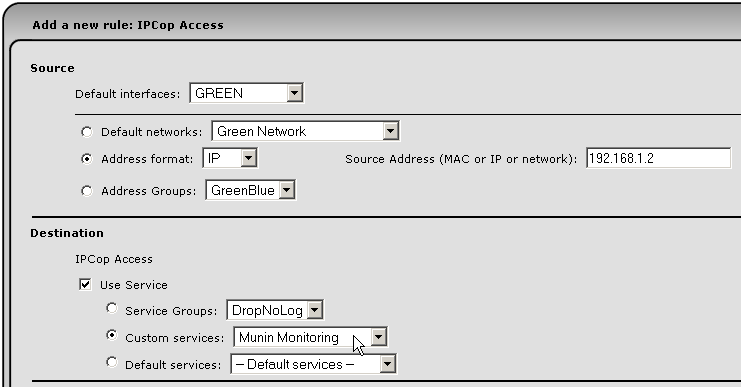
Make sure you define the source (interface and network or address) properly!
siehe oben 
Closing remarks
Please do not mail me for support etc., feel free to mail me though if you insist and want to transfer large amounts of money to my account  . .
In case of trouble, things not working, etc. post a message in the english or german IPCop support forums. I do visit those from time to time.
munin-ipcop-2.1.5.tar.gz
MD5 chksum: 547e2002d187ae3f2ed62c5645a206ba
This addon heavily relies on Munin. Brilliant scripting 
| 2014-04-09 |
2.1.5 |
Change URL for version check |
| 2014-03-04 |
2.1.4 |
Fix ipconntrack plugin |
| 2014-02-22 |
2.1.3 |
Improved some plugins |
| 2014-02-21 |
2.1.1 |
Fix missing default user, required in Munin v2 |
| 2014-02-14 |
2.1.0 |
Munin v2 for IPCop v2.1.1 |
| 2011-11-25 |
2.0.2 |
IPCop v2 |
| 2007-10-08 |
0.3.1 |
Added plugin for digitemp
Added Munin Node to status page
Make loglevel configurable
Fix if_ for some WLAN cards, set default group in cfgfile |
| 2007-08-03 |
0.1.2 |
Small IPCop specific modification in if_ script |
| 2007-07-29 |
0.1.1 |
Fix minor installer error |
| 2007-07-28 |
0.1.0 |
First online version |
|
