BAN - Solms


What is EXTRA INTERFACES

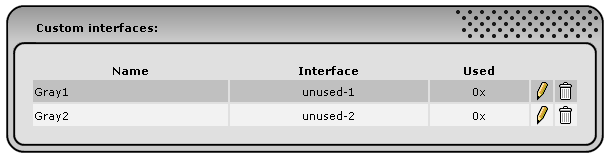
Extra Interfaces extends the maximum number of network interfaces of your IPCop from 4 to 8. Additional to the Green, Red, Blue and Orange interfaces you can get a Gray 1 - 4 interface (provided you have enough hardware )


Installation

  • download xtiface-ipcop-<version>.tar.gz from this webpage
  • copy 'xtiface-ipcop-<version>.tar.gz' to any directory of your choice ( e.g. to '/root' using WinSCP or SCP [ port 222! ] )
  • go straight to the console or open a console connection ( e.g. via Putty or SSH [ port 222! ] )
  • login as user 'root'
  • change to the directory you have copied the file to ( e.g. type 'cd /root' )
  • extract the archive ( type 'tar xvfz xtiface-ipcop-<version>.tar.gz' )
  • change to installation directory ( type 'cd xtiface-ipcop-<version>' )
  • to install the addon type './install -i' ( to uninstall type './install -u' )

Upgrading

Just follow the steps under Installation, no need to uninstall first.


Usage

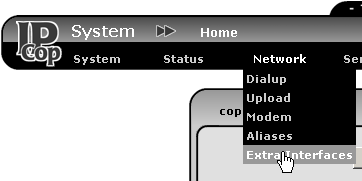
After installation you should have an extra menu-item for Extra Interfaces:


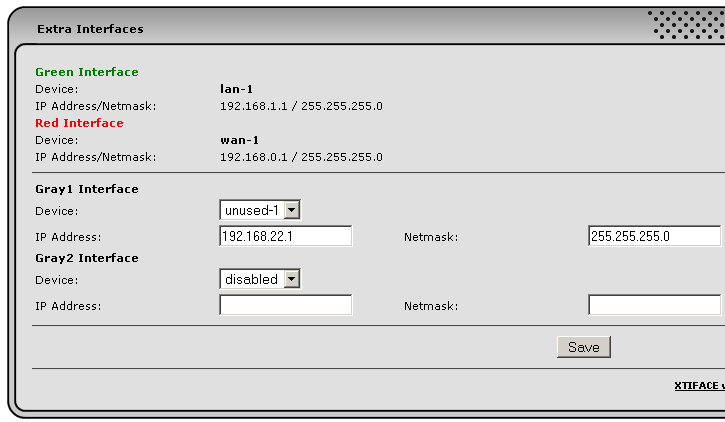
If there are any free interfaces in your IPCop they will be offered along with some (crude) options for interface behaviour:


If there are no free interfaces, please read the section HW probing below.


You will also find that the settings page for the DHCP Server now has options for Gray 1 - 4, behaviour is similar to DHCP on Green/Blue. Short explanation of the settings available to the extra interfaces:
IPCop DNS: devices can use the DNS services of IPCop
RED HTTP: devices can use internet http (tcp/80 is open to the internet)
RED DNS: devices can use internet DNS services (udp/53 is open to the internet)
RED TCP, UDP, ICMP: devices can more or less communicate freely to internet DNS services (tcp/udp/icmp is open to the internet)

To be able to use proxy you must add the gray network(s) to the ACL of squid, i.e. add following line to /var/ipcop/proxy/acl:
acl IPCop_networks src 192.168.22.0/255.255.255.0

To use transparent also add following line:
http_port 192.168.22.252:800 transparent

After making your modifications to ACL, restart proxy using the webinterface.
If you are using Advanced Proxy, only the second mod is necessary (in /var/ipcop/proxy/advanced/acls/include.acl). You can add the network conveniently through the Adv. Proxy webinterface.

HW probing

There is no auto hardware detection done (opposed to what setup does). If you know which kernel module your additional HW needs, just do a 'modprobe modulename' on IPCop console, then configure Extra Interfaces. You'll also need to add the '/sbin/modprobe modulename' command to /etc/rc.d/rc.local, to make things work after a reboot.
If you do not know the kernel module, you might try and use IPCop setup. Reconfigure your cards and look in /var/ipcop/ethernet/settings for *_DRIVER.

Was ist EXTRA INTERFACES

siehe oben

Closing remarks

Please do not mail me for support etc., feel free to mail me though if you insist and want to transfer large amounts of money to my account .
In case of trouble, things not working, etc. post a message in the english or german IPCop support forums. I do visit those from time to time.

Download


 xtiface-ipcop-0.5.5.tar.gz

MD5 chksum: 13f850bfdbb5b860cadcc19e96aa81b3


Credits

Special thanks to Tom 'wintermute' for the logo

Thanks to 'paco' for reporting and help tracking ip/netmask bug.
Thanks to Keven for the French translation.


History

2008-03-24 0.5.5 Write GRAY*_BROADCAST to config file
2007-11-07 0.5.4 Fixed a bug which stopped DHCP from working on gray 3 and 4
2007-05-14 0.5.3 French translation
2007-04-28 0.5.2 Fixed installation of restartdhcp
2007-04-02 0.5.1 Transparent proxy
restructure rules (slightly)
redefined RED HTTP/DNS options
2007-01-04 0.2.0 Increased to 4 interfaces
added option for proxy port
also allow ICMP (ping) to internet
2006-11-06 0.1.0 Some small improvements for DHCP
2006-11-05 0.0.3 Bugfix in installer and for DHCP page
2006-11-04 0.0.2 Added DHCP
2006-08-27 0.0.1 First online version

  Last modified: 2008-03-24